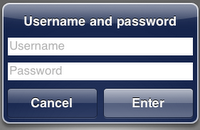
- 首先,你要初始化一個UIAlertView物件。然後你必須將message的參數值設為@”\n\n\n”,這是用來多留幾行空白以便擺放輸入框欄位。
- 建立兩個UITextField物件,將他們加至UIAlertView裡成為subview。別忘了設定輸入框的背景色(setBackgroundColor)、預設文字(setPlaceholder)、安全表示(setSecureTextEntry,輸入文字時會變成星號,用於密碼欄)。
- 最後,在呈現UIAlertView時,在垂直位移加上一點Shift值並且有需要的話將之設定為FirstResponder。
Source Code:
01.UITextField *textField;02.UITextField *textField2;03. 04.UIAlertView *prompt = [[UIAlertView alloc] initWithTitle:@"Username and password"05.message:@"\n\n\n" // IMPORTANT06.delegate:nil07.cancelButtonTitle:@"Cancel"08.otherButtonTitles:@"Enter", nil];09. 10.textField = [[UITextField alloc] initWithFrame:CGRectMake(12.0, 50.0, 260.0, 25.0)];11.[textField setBackgroundColor:[UIColor whiteColor]];12.[textField setPlaceholder:@"username"];13.[prompt addSubview:textField];14. 15.textField2 = [[UITextField alloc] initWithFrame:CGRectMake(12.0, 85.0, 260.0, 25.0)];16.[textField2 setBackgroundColor:[UIColor whiteColor]];17.[textField2 setPlaceholder:@"password"];18.[textField2 setSecureTextEntry:YES];19.[prompt addSubview:textField2];20. 21.// set place22.[prompt setTransform:CGAffineTransformMakeTranslation(0.0, 110.0)];23.[prompt show];24.[prompt release];25. 26.// set cursor and show keyboard27.[textField becomeFirstResponder];Reference:
http://fstoke.me/blog/?p=2643


 發表文章
發表文章


沒有留言:
張貼留言